PIXNET Logo登入

經驗交流分享與備忘

跳到主文

感情最痛恨 劈腿. 背叛 與 欺騙

部落格全站分類:數位生活

  • 相簿
  • 部落格
  • 留言
  • 名片
  • 7月 04 週一 201616:24
  • How do I disable X at boot time so that the system boots in text mode?


Edit /etc/default/grub with your favourite editor, e.g. nano:
sudo nano /etc/default/grub

Find this line:
GRUB_CMDLINE_LINUX_DEFAULT="quiet splash"
Change it to:
GRUB_CMDLINE_LINUX_DEFAULT="text"
Update GRUB:
sudo update-grub


For systems that use systemd
This is an additional step for systemd releases, e.g. Ubuntu 15.04, the steps above for grub are still necessary.
You need to tell systemd to not load the graphical login manager:
sudo systemctl enable multi-user.target --force
sudo systemctl set-default multi-user.target

You will still be able to use X by typing startx after you logged in.
Original url http://askubuntu.com/questions/16371/how-do-i-disable-x-at-boot-time-so-that-the-system-boots-in-text-mode
(繼續閱讀...)
文章標籤

本熊 發表在 痞客邦 留言(0) 人氣(23)

  • 個人分類:系統應用
▲top
  • 9月 25 週二 201217:38
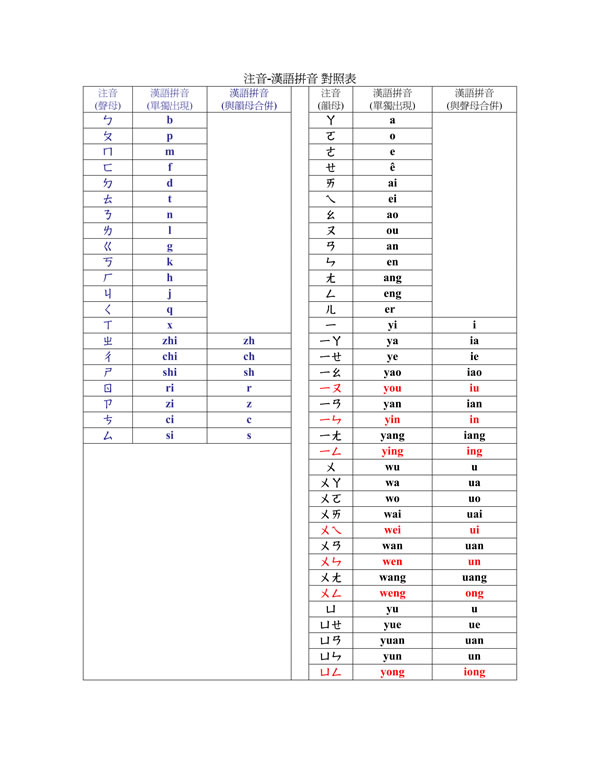
  • [轉貼] 注音 v.s 拼音 對照表

注音符號與漢語拼音對照表
常需要去大陸洽公或已經常駐的朋友,在使用電腦要打字的時候,常會碰到輸入法的問題,若要重新學習最快的方式就是將自己知道的注音符號與漢語拼音做一個對照,例如 ㄅ | B、ㄆ | P 的概念,相信學習一個新的輸入法會很快,Google 也有出一個漢語拼音的輸入法,可以下載來使用。

ReadImage    
(繼續閱讀...)
文章標籤

本熊 發表在 痞客邦 留言(4) 人氣(77,787)

  • 個人分類:系統應用
▲top
  • 2月 04 週六 201200:33
  • [轉帖] 对于MySQL使用 GROUP_CONCAT 函数 的方式进行处理(非常简单)

如何透過 concat 將查詢結果資料記錄組合成一串 ?
 

原始資料:
(繼續閱讀...)
文章標籤

本熊 發表在 痞客邦 留言(0) 人氣(54)

  • 個人分類:系統應用
▲top
  • 1月 14 週六 201202:30
  • [轉帖] git-upload-pack: command not found, how to fix this correctly


I have been using git to keep two copies of my project in sync, one is my local box, the other the test server. This is an issue which occurs when I log onto our remote development server using ssh;
git clone me@me.mydevbox.com:/home/chris/myproject Initialized empty Git repository in /tmp/myproject/.git/ Password: bash: git-upload-pack: command not found fatal: The remote end hung up unexpectedly fetch-pack from 'me@me.mydevbox.com:/home/chris/myproject' failed.
(the file-names have been changed to protect the guilty... !)
Both boxes run Solaris 10 AMD. I have done some digging, if I add --upload-pack=which git-upload-pack the command works, (and proves that $PATH contains the path to 'git-upload-pack' as per the RTFM solution) but this is really annoying, plus 'git push' doesn't work, because I don't think there is a --unpack= option.
Incidentally, all the git commands work fine from my local box, it is the same version of the software (1.5.4.2), installed on the same NFS mount at /usr/local/bin.
Can anybody help?


Make sure git-upload-pack is on the path from a non-login shell. (On my machine it's in /usr/bin).


To see what your path looks like on the remote machine from a non-login shell, try this:


ssh you@remotemachine echo \$PATH

(That works in Bash, Zsh, and tcsh, and probably other shells too.)


If the path it gives back doesn't include the directory that has git-upload-pack, you need to fix it by setting it in .bashrc (for Bash), .zshenv (for Zsh), .cshrc (for tcsh) or equivalent for your shell.


You will need to make this change on the remote machine.


原文轉貼自 http://stackoverflow.com/questions/225291/git-upload-pack-command-not-found-how-to-fix-this-correctly


(繼續閱讀...)
文章標籤

本熊 發表在 痞客邦 留言(0) 人氣(222)

  • 個人分類:系統應用
▲top
  • 12月 24 週六 201123:26
  • [git] Setting Up A Public Repository

Assume your personal repository is in the directory ~/proj. We first create a new clone of the repository and tell git-daemon that it is meant to be public:
$ git clone --bare ~/proj proj.git $ touch proj.git/git-daemon-export-ok
The resulting directory proj.git contains a "bare" git repository--it is just the contents of the ".git" directory, without any files checked out around it.
Next, copy proj.git to the server where you plan to host the public repository. You can use scp, rsync, or whatever is most convenient.
(繼續閱讀...)
文章標籤

本熊 發表在 痞客邦 留言(0) 人氣(75)

  • 個人分類:系統應用
▲top
  • 11月 12 週六 201102:19
  • [轉貼] 修正 MySQL adodb UTF-8亂碼問題

MySQL 伺服器版本: 5.0.22-log
問題點:寫入 UTF-8編碼中文字進MySQL DB,變成亂碼

修改: adodb/drivers/adodb-mysql.inc.php
兩個連線function _connect _pconnect
function _connect($argHostname, $argUsername, $argPassword, $argDatabasename)
{
if (ADODB_PHPVER >= 0x4300)
$this->_connectionID = mysql_connect($argHostname,$argUsername,$argPassword,
$this->forceNewConnect,$this->clientFlags);
else if (ADODB_PHPVER >= 0x4200)
$this->_connectionID = mysql_connect($argHostname,$argUsername,$argPassword,
$this->forceNewConnect);
else
$this->_connectionID = mysql_connect($argHostname,$argUsername,$argPassword);
if ($this->_connectionID === false) return false;
+ @mysql_query("SET NAMES 'utf8'", $this->_connectionID);
if ($argDatabasename) return $this->SelectDB($argDatabasename);
return true;
}
function _pconnect($argHostname, $argUsername, $argPassword, $argDatabasename)
{
if (ADODB_PHPVER >= 0x4300)
$this->_connectionID =
mysql_pconnect($argHostname,$argUsername,$argPassword,$this->clientFlags);
else
$this->_connectionID = mysql_pconnect($argHostname,$argUsername,$argPassword);
if ($this->_connectionID === false) return false;
+ @mysql_query("SET NAMES 'utf8'", $this->_connectionID);
if ($this->autoRollback) $this->RollbackTrans();
if ($argDatabasename) return $this->SelectDB($argDatabasename);
return true;
}
(繼續閱讀...)
文章標籤

本熊 發表在 痞客邦 留言(0) 人氣(458)

  • 個人分類:系統應用
▲top
  • 8月 26 週五 201114:05
  • [轉貼] CentOS 5 的 RPMforge

<!>
CentOS 5 的 RPMforge
預設的 RPMforge 軟件庫並不會取代任何 CentOS 的基本套件。過往有些套件的確會這樣做,但它們現在已收錄在一個獨立(rpmforge-extras)、預設被停用的軟件庫。
你可以在 http://packages.sw.be/ 取得所有 RPMforge 套件的清單。
(繼續閱讀...)
文章標籤

本熊 發表在 痞客邦 留言(0) 人氣(104)

  • 個人分類:系統應用
▲top
  • 8月 23 週二 201100:33
  • 用 find ,sed, xargs, mv 改檔名

有一堆 thumb_xxxxxxxx.jpg/gif 的圖檔 ,要通通去除 thumb_ 字樣, 想得到的就是一個一個改,  或寫一支 script 批次改
這是很笨的方法 ,
透過 find, sed, xargs, mv 及 管線 | 搭配, 一行指令就解決, 如以下指令.
(繼續閱讀...)
文章標籤

本熊 發表在 痞客邦 留言(0) 人氣(1,813)

  • 個人分類:系統應用
▲top
  • 7月 01 週五 201110:53
  • [轉貼] xxx is not in the sudoers file解决方法

用sudo时提示"xxx is not in the sudoers file. This incident will be
reported.其中XXX是你的用户名,也就是你的用户名没有权限使用sudo,我们只要修改一下/etc/sudoers文件就行了。下面是修改方
法:
1)进入超级用户模式。也就是输入"su -",系统会让你输入超级用户密码,输入密码后就进入了超级用户模式。(当然,你也可以直接用root用)
2)添加文件的写权限。也就是输入命令"chmod u+w /etc/sudoers"。
3)编辑/etc/sudoers文件。也就是输入命令"vim /etc/sudoers",输入"i"进入编辑模式,找到这一 行:"root
ALL=(ALL) ALL"在起下面添加"xxx ALL=(ALL) ALL"(这里的xxx是你的用户名),然后保存(就是先按一
下Esc键,然后输入":wq")退出。
4)撤销文件的写权限。也就是输入命令"chmod u-w /etc/sudoers"。
(繼續閱讀...)
文章標籤

本熊 發表在 痞客邦 留言(0) 人氣(64,546)

  • 個人分類:系統應用
▲top
  • 6月 09 週四 201111:29
  • [轉貼] [VIM] 常用指令

:vs 是左右切  可用 ctrl+w+< 和 ctrl+w+> 來移動視窗大小
:sp 是上下切  可用 ctrl+w++ 和 ctrl+w+- 來移動視窗大小
:g/被替代的字串/s//新字串/g
用「新字串」取代「被替代的字串」
(繼續閱讀...)
文章標籤

本熊 發表在 痞客邦 留言(0) 人氣(1,549)

  • 個人分類:系統應用
▲top
12...5»

參觀人氣

  • 本日人氣:
  • 累積人氣:

文章分類

toggle 作業系統相關 (9)
  • FreeBSD (8)
  • IPv6 Logo (2)
  • Visual C# (1)
  • Visual C# (1)
  • Mac使用心得 (5)
  • Synology NAS應用 (0)
  • 系統應用 (49)
  • 防毒防駭 (5)
  • 系統安裝 (30)
toggle 投資理財 (2)
  • 科技產業 (8)
  • 投資學習 (9)
toggle 網頁設計相關 (6)
  • Flex程式設計 (5)
  • MySQL資料庫 (13)
  • ASP.NET程式設計 (1)
  • CSS樣式表應用 (5)
  • Flex (1)
  • PHP程式設計 (51)
  • Perl 程式設計 (1)
  • Windows系統應用 (2)
  • 好書推件 (1)
  • Android程式設計 (10)
  • C程式設計 (2)
  • Linux相關應用 (18)
  • Java程式設計 (6)
  • JAVAt程式設計-GWT (7)
  • Eucalyptus XEN (2)
  • 喻道故事 (1)
  • 下載資源 (2)
  • 終生學習 (7)
  • Goolge 新玩意 (1)
  • 英文學習心得 (3)
  • 工商服務 (12)
  • 勵志成長 (18)
  • 新聞時事 (17)
  • 讀者服務 (3)
  • JavaScript (22)
  • 省錢大作戰 (15)
  • 搶錢大作戰 (2)
  • 趣味分享 (50)
  • 感情生活 (15)
  • 用DSLR寫日記 (20)
  • 程式設計 (7)
  • 職場人生 (16)
  • 健康生活 (63)
  • 未分類文章 (1)